It Started Working Too Well to Keep Doing Manually
While building BlueDrip, I kept running into the same pattern across different industries. Here’s the clearest version of it.
Picture a gym owner — been running a small fitness studio for eight years, knows every member by name. When a new prospect does a free trial, he texts them two days later. Not from a business line. Not from a CRM. From his personal number, the one he hands out at the front desk, the one a lot of members already have saved.
The reply rate on those texts is somewhere around 60%. He closes trials at that rate because the follow-up feels like it’s from a person, not a business — because it is.
Then the studio grows. He’s running 40 trial leads a month. Texting each one personally is eating his evenings. He already uses Mindbody for bookings and billing — one of the most popular platforms in the fitness space. Someone in a gym owners’ Facebook group tells him to connect it to GoHighLevel and run automated SMS follow-ups. Three other gym owners he respects are doing exactly that. Everyone says the same thing: automate it, scale the follow-up.
So he does. He builds the sequences. The copy is good — tighter than what he was writing manually. The timing is right. The automation runs cleanly.
In the first month, his close rate drops to 28%.
He assumes it’s the copy. Rewrites it. Still flat. He adjusts the timing. Still flat. He tries a new offer. Nothing moves.
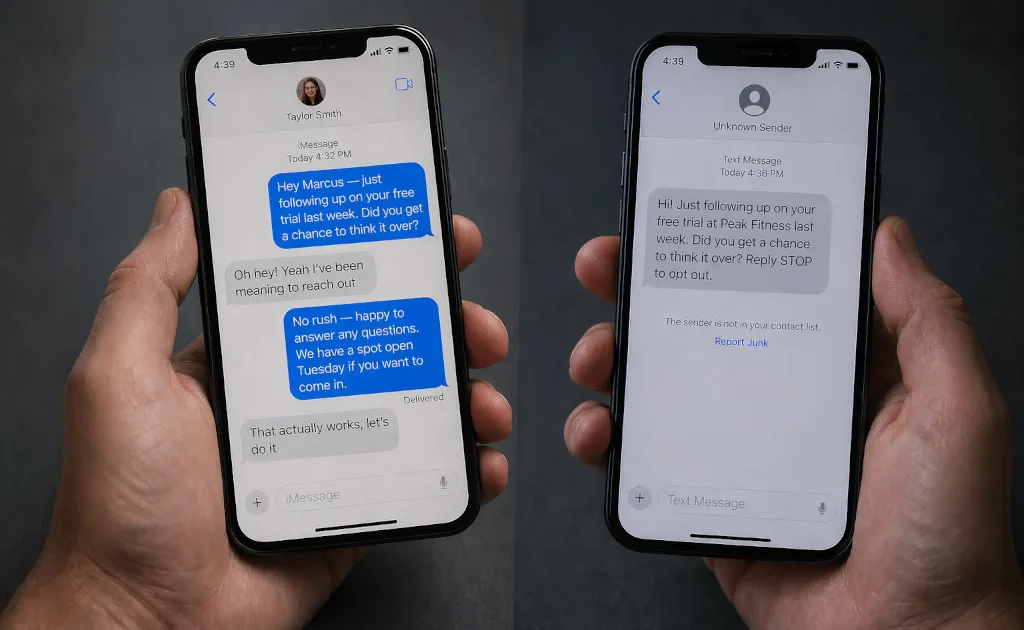
Then one afternoon, he follows up with a lead manually — the old way, from his phone. The reply comes in four minutes. “Oh hey! Yeah sorry, I’ve been meaning to get back to you — would next week work?”
He pulls up what the CRM sent the same person. Three messages, spaced out correctly, good copy. All delivered. Zero replies.
The CRM had been texting from a number they didn’t recognize.
What Actually Decides Whether Someone Opens a Text
The decision to open a message happens in under half a second. In that window, the recipient isn’t reading the copy. They’re answering one question unconsciously: who is this?
The answer comes from a single scan: does this number match anything in my contacts?
If yes — it lands in the main Messages thread, in the same place where their friends and family text them. It gets opened.
If no — it gets the unknown sender treatment. On iOS, that means a grey thread, no notification sound on some settings, and the “Report Junk” link sitting directly under the first message. On iOS 26, a new on-device spam filter routes unknown senders into a separate section automatically — no badge, no alert, no indication the message arrived at all. We covered how that filter works in our iOS 26 field guide.
The gym owner’s CRM was landing in the unknown sender section every time. All three follow-ups, for every lead. Delivered, technically. Read by almost no one.
His personal number landed in the main thread because leads had saved it from the front desk. Same message, different number, completely different result.
The Trade Every CRM Tool Makes You Take
This isn’t a critique of any specific platform. It’s a description of how the business SMS category works.
To send outbound messages at any kind of scale, every commercial platform routes your messages through A2P (Application-to-Person) infrastructure — a phone number provisioned through Twilio or a similar carrier, assigned to your account, sent on your behalf. Your contacts receive a message from a 10-digit number they’ve never seen, in an area code that may or may not match yours, with no name attached to it. Mindbody’s own Marketing Suite works the same way — dedicated sender, unknown number. GoHighLevel does too, whether you’re routing through Twilio directly or through any other integration.
The 10DLC framework that governs this in the US — brand registration, campaign registration, carrier surcharges — was already expensive before 2026. This year it got more so: carrier fees went up in January, and T-Mobile added a $50 campaign activation fee in March on top of the existing structure. You pay more, and you’re still sending from a number nobody recognizes. The fees are covered in more detail in our 2026 channel comparison.
Cloud iMessage providers handle the problem differently — fleets of Apple IDs on Mac hardware in datacenters, each provisioned with a dedicated number. But the result is the same: a number with no history, no relationship, and no trust. In an iOS 26 world, that’s precisely the profile the spam filter was built to catch.
There is no workaround for this inside the dedicated-number model. The dedicated number is the product.
There’s a second problem layered on top of the number. A2P messaging routes through carrier infrastructure that mandates compliance language — which means every message your CRM sends arrives with “Reply STOP to opt out” at the bottom. Before the recipient reads a single word of your copy, they’ve already been told it’s automated marketing. The trust is gone before the message starts. This is not a design choice any platform made — it’s a legal requirement of the infrastructure. You cannot opt out of it and stay compliant.
The Blue Bubble Is a Signal, Not a Color
When a message arrives as an iMessage — the blue bubble — it carries a specific set of implicit signals. Link previews. Read receipts. Tapbacks. No “Reply STOP to opt out” disclaimer. No carrier watermark. No indication that this is an automated outreach.
More importantly: iMessages travel through Apple’s servers, not through carrier A2P infrastructure. They don’t hit the same filtering layers that flag business SMS. They arrive looking exactly like a message from a real person — because, from the infrastructure’s perspective, they are.
The numbers on iMessage from a real sender have been consistent for years: 98% open rates, most within three minutes. Reply rates around 45% — versus roughly 6% for cold email and well below that for business SMS. The channel doesn’t explain all of that gap. The sender does. But the channel reinforces it at every layer.
For operators whose clients are a mix of iPhone and Android users: when you send from your Mac’s Messages app, it uses iMessage for Apple recipients automatically and falls back to regular SMS for everyone else. No second pipeline, no separate setup — the same sequence reaches both, and each recipient just sees a text from your real number.
The Operators This Applies To
Not every operator. But a specific kind: businesses where the person doing the outreach is part of the trust equation.
Fitness studios and gym owners following up with trial members. The trainer they met has a real number. “Peak Fitness Outreach” does not.
Realtors and mortgage brokers nurturing leads through a buying cycle that runs weeks or months. A three-step check-in from the agent’s real number keeps the relationship warm. The same message from a CRM business line reads like marketing.
Small clinics and wellness practices — chiropractors, physiotherapists, massage therapists — where patients booked with a specific provider. The expectation is communication from that provider, not an automated line.
The pattern is the same everywhere: the operator’s personal involvement in the relationship is what makes the business work. Automating the follow-up through a dedicated business number severs the one thing that was creating the trust.
Automating Without Breaking It
The reason small operators end up on CRMs isn’t that they wanted to give up their number. It’s that texting 80 leads manually across a three-step sequence every month isn’t sustainable — and there was no other option.
BlueDrip is the automation layer that doesn’t require the trade. You install the native macOS app, it runs on your Mac under your existing Apple ID, and you build drip sequences the same way you would in any CRM. The sequences run automatically — first message, three days, second message, five days, third message — from your real number, from the thread your contacts already recognize.
When someone replies, the sequence stops instantly. You get a notification. The conversation switches to you. The recipient never experienced an automated pipeline — because from their end, they were texting the same person they’ve texted before.
For operators already on GoHighLevel, Mindbody, HubSpot, or another CRM: BlueDrip connects to your existing tools. Your contacts and pipeline stay where they are. The outbound messages route through your number instead of a Twilio line nobody recognizes.
A single Apple ID handles roughly 80 to 120 messages per day — enough for most solo operators and small teams. When you need more, BlueDrip supports multiple numbers running on the same Mac through separate macOS user accounts, no additional hardware required. The setup and warm-up details are in the iMessage blocks guide.
What Actually Changed
The gym owner’s close rate didn’t drop because the CRM was bad at writing follow-ups. It dropped because the follow-ups stopped coming from the person the leads trusted.
When he switched back to sending from his real number — this time with BlueDrip handling the sequencing so he’s not doing it manually — the close rate came back. The copy was almost identical to what the CRM was sending.
The variable was the sender. It’s almost always the sender.
It’s also, for what it’s worth, what BlueDrip was built around.